

Today, work is immediate, collaborative and omnipresent. Whether you're working from home, traveling to a trade show, or collaborating with third-party partners, access to tools and information needs to be fast, reliable, and transparent no matter where you are.
However, this flexibility creates a major challenge for businesses: How do you provide seamless access to users while mitigating the security risks associated with remote access?
The decline of legacy solutions (VPNs and VDI)
For a long time, the VPN (Virtual Private Network) and VDI (Virtual Desktop Infrastructure) were the standards. But these technologies were designed for a time when applications mostly resided in the corporate network.
Today, the browser has become the new workspace. Legacy solutions struggle to adapt because they create bottlenecks, are expensive to scale, and don't provide the granular control needed to secure today's cloud environments.
Why the model needs to change:
- Unmanaged devices (BYOD): The use of personal or third-party terminals introduces massive risks of malware and data exfiltration, as these devices escape centralized control.
- Lateral movement: A device compromised via a VPN can become a conduit for an attacker to navigate deep into the internal network.
From ZTNA to Zero Trust Access (ZTA)
The concept of”Zero Trust“is based on a simple principle: authentication and authorization are always necessary, and implicit trust cannot be derived from the user's location.
While the ZTNA (Zero Trust Network Access) focused on the network, the ZTA (Zero Trust Access) adopted by VirtualBrowser moves the needle to a comprehensive approach that includes all assets, without ever assuming the safety of a user, device, or location.
The evolution of access security
VirtualBrowser, the most transparent, granular, and secure ZTA approach.
Instead of relying on network-based controls, VirtualBrowser Move security directly to where the work gets done: in the browser.
How VirtualBrowser revolutionizes web access:
- Transparency: By using VirtualBrowser, organizations provide secure access to applications without having to install complex infrastructure and without having to deploy agents on user workstations. A simple URL is transmitted to access the web application.
- Granular control: VirtualBrowser allows control both on the applications that can be accessed, but also on the action rights that will be authorized, according to the user profiles and the applications to which they will have the rights to access (copy and paste, upload, download, download, print, print, dynamic watermark)
- The end of the BYOD puzzle (through Protocol Breach) : That's the strength of our pixel rendering technology. When a user connects from an uncontrolled computer (infected or not), no code passes between your IS and his computer. It only receives a video stream from your web application. There is a total seal between the unsecured workstation and your IS. The malware stays at the door.
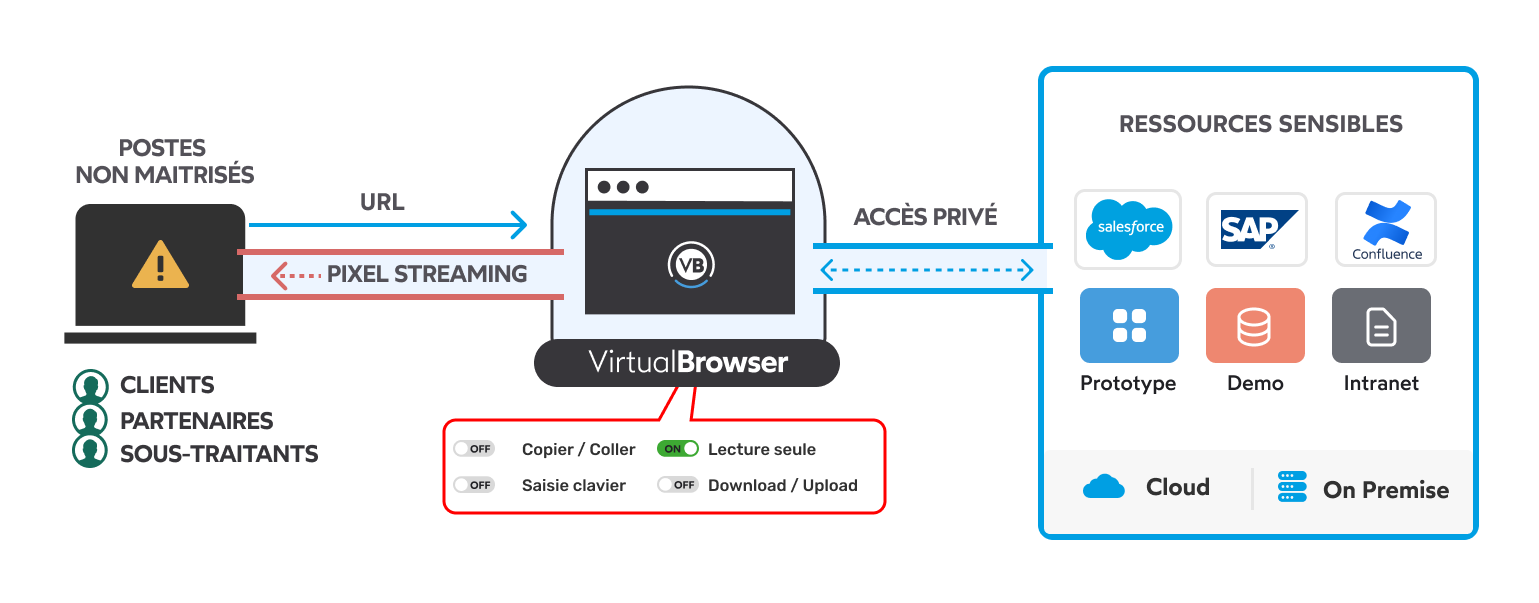
In a world where the browser has become the default workstation, it is time to leave the network behind and focus on application access security. VirtualBrowser makes this transition to Zero Trust Access a reality, offering modern protection adapted to hybrid work, which does not sacrifice performance or user experience. Robustness validated by our CSPN certification from ANSSI.